


One click on the board.
Everything follows.
Click a mover once: the montage loads the ticker, the Desk loads the dilution, the chart loads the levels.


 DAS· ALSO:
 and more
ADR:N
and more
ADR:N
The Scanner accumulates every gapper, spiker and halt since premarket — a 7 AM mover is still one click away at noon.
The whole session, one board.
A full-session accumulator: every mover since pre-market stays on the board — not a board that resets and forgets.
2SPAC1HALT DOWN1HALT UPfloat squeezeMOMO alerts
Acceleration of 10%+ in 5 minutes, flagged live — pre-market and after-hours included.
Halts & SSR
Real halt status with reopen direction, plus short-sale-restriction chips on every row.
Pos% & session high
Where price sits between the session low and the latched high — the peak sticks even through a bad print.
Depth & charts on hover
Hover any row: 1-minute and daily charts, L2 depth, bounce spark — no new window.
The board starts simple. Enable what you need.
Live Events, Watchlist, hover charts — on when you want them, off when you don't.
Live Events — MOMO alerts
Momentum, volume surges and session highs stream in at the top — severity-ranked, auto-expiring after 3 minutes.
1earnings am — watch $2.40float squeeze setupWatchlist
Pin the tickers you're stalking above the board. One click moves rows either way — notes attached.
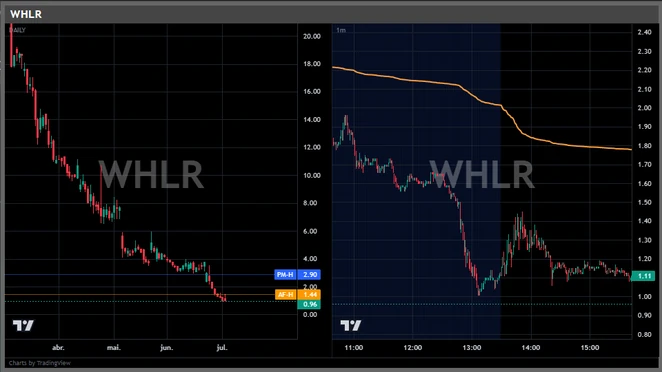
Hover charts
Daily and 1-minute side by side, with pre-market and after-hours highs marked right on the price scale.
One board. Every window.
Click a mover and the ticker loads in your linked windows. Map single and double click to different montages — no retyping symbols.
DAS Montage TradingViewSterlingsoonZeroProsoonMONTAGE 01MONTAGE 02
One click → Montage 01 · double click → Montage 02. You choose per target.
Long or short: the instant you switch the ticker, the dilution read is already there — the same second the chart loads.
ADR:N
Shelf capacity, ATM sales, warrants and real float for the ticker on your montage — pulled from the filings, refreshed on every switch.
Dilution risk, pinned to your montage.
An always-on-top overlay that follows whatever ticker your DAS montage shows — zero clicks, zero re-typing.
One dilution read
Shelf, ATM, warrants, converts and S-1 → one green/yellow/red rating you read in peripheral vision.
Real float
Insider-aware, split-adjusted — not your screener's stale number.
Cash runway & filing chips
The setup for a raise — active shelf, ATM capacity, cash left — with the filings that matter as chips on the card.
- Ticker & statusTicker, market cap, country and ADR status — always on top, linked to your montage.01
- Real float & ownershipInsider-aware, split-adjusted float. D = registered dilution that can hit it. INST and insider stakes beside it.03
- Dilution risk, ratedOne overall read, broken into Offering, History, Supply and Cash Need.05
- Dilution instrumentsEvery live instrument: warrants, converts, shelf, ATM — with strike, size and expiry.07
- News, bucketedBreaking, latest and earlier — tagged by type and source, aging in real time.09
ADR:N
- 02AI Insight PROOne click opens the AI read of the runner — the dot shows it's fresh. Sector on the right.
- 04Rotation · Short · Splits How many times the float traded today, short interest, and reverse-split history.
- 06Cash runway Months of cash left, burn rate, estimated cash — plus going-concern and NASDAQ compliance flags.
- 08Why it's moving The catalyst, flagged — with the headline driving the move.
Panda Desk — linked to your montage
DAS· ALSO:and more
ADR:N
Switch the ticker in DAS — Panda follows. Zero clicks.
The flagship module · PRO
AI Insight — the full picture, one panel.
The panoramic read the headlines won't give you: what this runner really is, the hidden levels that matter, and what's buried in the filings — so you size it up fast and form your own view.
Hidden levels
Offering prints, warrant strikes, gap origins — mapped as price levels, each with a trader's note.
What news won't tell you
Non-obvious findings dug out of filings and cap-table math — shelf vs market cap, ATM capacity, split history.
The play, named
Primary and secondary play, stage, and how confident the AI is on read and timing.
Going-concern biotech nameplate: a post-R/S 3.2M float, an effective $150M shelf and a live ATM keep the share count climbing while trial data stays two quarters out.
Whether the issuer prints one more pipeline PR to extend the runner before tapping the shelf, or starts at-market sales into the first sign of weakness.
The tape won't wait for your alt-tab.
Dilution in one tab, scanner on another screen, chart on a third. Every glance away is time off the tape. Panda collapses it into one screen — and into seconds.
TIME TO DECISION ON A LIVE MOVER
Your stack, consolidated.
Dilution data, a scanner and charts — normally three tabs, three bills, and your eyes in three places.
Stop alt-tabbing. Stop cross-checking. Start seeing.
| Feature | Panda | DilutionTracker | EdgeToTrade | Trade Ideas |
|---|---|---|---|---|
| Form factor | Native overlay on DAS | Web app | Web app | Desktop app |
| Dilution intelligence | ✓ | ✓ | ✓ | — |
| Full-session scanner | ✓ | — | ✓ | ✓ |
| Linked to your DAS montage | ✓ | — | — | — |
| AI read per ticker PRO | ✓ | — | — | ✓ |
| Everything you need to decide, in one place | ✓ | — | — | — |
| Published price (Jun 2026) | from $89.90/mo | from $49/mo | $49–149/mo | $127–254/mo |
| Separate window or extra browser tab | — | ✓ | ✓ | ✓ |
All prices in USD. Third-party pricing from public price pages, June 2026. Feature sets summarized — check each vendor for detail.
7-day free trial on both plans · cancel anytime · upgrade to Pro whenever you want
Proof
Built by traders. Judged by what it ships.
Real traders, real desks. This is who runs Panda every session — and why.

“I wasn't going to trust a scanner I wouldn't run on my own desk. Panda grew out of what was missing in my own small-cap trading: dilution in your face before you pull the trigger, and every mover of the session parked on the board. It's the tool I wish I'd had in my early years.”

“The overlay linked to the montage is what changed it for me. I switch the ticker in DAS and the real float, the dilution risk and the filings are already there — I don't open five tabs anymore to confirm what Panda already handed me.”

“The board accumulates the whole session. The mover that ran in pre-market is still there when I sit down — no losing the setup because it flashed and vanished.”

“I built Panda because alt-tabbing between dilution, scanner and chart cost me the seconds that decide the trade. One screen, one read — that's what we ship.”
“The MOMO alerts and HALT/SSR on the board pull me out of the dark on pre-market runners. I see the acceleration the moment it happens, not two minutes later on Twitter.”
“AI Insight saves me the 4 a.m. 8-K read. It tells me where the shelf, the ATM and the overhang are before I get in.”

Who builds this
BACKSIDE · Panda Trading Solutions
Panda is built by BACKSIDE — a small-cap trader's own tool, made for the desk it runs on. No fabricated reviews, no inflated numbers: the product ships, and the changelog is public.
See Panda running a real session
A full walkthrough on a live pre-market runner — Desk, Scanner and AI Insight working one real mover.
Two plans. You decide how much AI.
The whole trading desk — Scanner, overlay, Live Events and charts.
- ✓Desk overlay — dilution, float, filings, linked to DAS
- ✓Full-session Scanner with halts, SSR and notes
- ✓Live Events — MOMO alerts, pre-market included
- ✓Hover charts, watchlist and Live Events
- ✓All product updates included
The same desk, plus the AI read of every runner.
Everything in Starter, plus:
- ✓AI Insight — the panoramic read of the runner, in EN, PT and ES
- ✓Hidden levels plotted on the chart — offering prints, warrant strikes, gap origins
- ✓What the filings hide: the play named, with the AI's confidence on read and timing
Card required · auto-charges after the trial unless cancelled · 7-day refund, no questions
1-minute setup: download and run · your key arrives by email · Panda finds your DAS montages and links itself.
Frequently asked questions
Do I need DAS Trader Pro?
No. Desk, Scanner and charts run standalone. The montage link is the flagship integration — DAS today, more platforms on the roadmap.
Which brokers work with the DAS link?
Any DAS-based broker: CenterPoint, Cobra, SageTrader, Ocean One and others — plus TradingView, live today. Sterling, ZeroPro and BlackArrow are coming.
Where does the data come from?
Real-time US market data — pre-market, regular hours and after-hours — plus dilution and filings intelligence built from SEC EDGAR.
What do I need to run it?
Windows 10 or 11. It idles quietly next to DAS.
How does the trial work?
7 days free with a card on file, on Starter and on Pro. Cancel anytime during the trial and you pay nothing. Every charge has a 7-day no-questions refund.
Which languages?
The whole desk works in English, Portuguese and Spanish — and on Pro, AI Insight writes its read in your language too.
How do I cancel or manage my subscription?
Open Manage subscription (linked in every receipt) — switch between Starter and Pro, move between monthly and annual, update your card, pull invoices or cancel. Hosted by Stripe. Cancellations run to the end of the paid period.
What's the difference between Starter and Pro?
Starter is the whole desk: Scanner, Desk overlay, Live Events, charts and modules. Pro adds AI Insight in EN, PT and ES plus the AI levels plotted on the chart. Upgrading is immediate — from Manage subscription you pay only the pro-rata difference for the days left in the cycle, charged on the spot, and Pro unlocks on the same key. A downgrade takes effect at the end of the current cycle, and you keep Pro until then. Cancelling does not refund the period already paid: access simply runs to the end of it.
Is Panda Trading Solutions related to Panda Trading Systems (PandaTS)?
No. Panda Trading Solutions (tspanda.com, by BACKSIDE) is a Windows companion for DAS Trader Pro made for small-cap day traders. Panda Trading Systems / PandaTS (pandats.com) is an unrelated white-label technology provider for forex and CFD brokerages. Different company, different product.